
In today’s digital-first world, having a strong online presence is no longer optional—it’s essential. But how do you make your business stand out amidst the competition? The answer lies in mastering your Google My Business profile. Whether you’re a small local shop or a growing enterprise, learning how to list your business on Google can significantly increase your visibility, attract new customers, and drive meaningful engagement. This guide will walk you through everything you need to know, from setting up your company on Google to optimizing it for maximum traffic and results. Ready to take control of your online success? Let’s get started!
What is Google My Business?
Google My Business (GMB), now officially called Google Business Profile, is a free and essential tool that allows businesses to manage their online presence on Google Search and Maps. But what is Google My Business, and how can it help your business thrive? It acts as your digital storefront, showcasing your address, hours, contact details, and even customer reviews—all in one place. By using Google for local business, you ensure that potential customers can find and engage with your company effortlessly.
One of the key features of GMB is how your business appears as a card on Google Maps. On mobile devices, the card is compact and scrollable, showing critical information like the name, rating, address, and a photo carousel. On desktop, the card is more detailed, occupying a side panel with easy access to directions, reviews, and a “Call Now” button. This visual distinction helps users interact with your business differently based on the device they’re using.
So, how does Google My Business work, and why is it vital? It connects your business with local customers searching for what you offer, showcasing essential details tailored to their device and location. Take full control of your digital presence with our local search engine optimization services and ensure your GMB card looks professional and engaging across all platforms.Understanding what is Google Business and optimizing your profile can make the difference between getting noticed or overlooked in today’s competitive digital landscape.
Google My Business Benefits
Leveraging a Google My Business page is one of the most effective ways to enhance your online visibility and drive local customer engagement. Here’s how your business can benefit:
Increased Local Visibility and Better Rankings
Your Google page for my business ensures that your company appears in relevant searches and on Google Maps. With optimized listings, potential customers can easily find your location, hours, and services, helping you stand out in local search results. Research by BrightLocal reveals that 46% of all Google searches have local intent, and 78% of local mobile searches result in an offline purchase within 24 hours. A Google My Business page is your ticket to leveraging this trend, ensuring that your business stands out in local search results and on Google Maps.
Boosted Customer Trust
A study by Podium found that 93% of consumers say online reviews influence their buying decisions, and businesses that actively respond to reviews see a 12% increase in customer trust. With a Google Maps my business listing, you can engage with your customers by responding to reviews, answering questions, and sharing updates.
Improved Engagement and Traffic
With features like messaging, reviews, and Q&A, you can directly engage with customers, answer their questions, and share updates. This interaction not only improves your relationship with clients but also encourages clicks to your website or visits to your store.
Free and Effective Marketing
Google My Business is a free tool that lets you advertise your business without a hefty budget. From sharing posts to uploading videos and photos, it’s a cost-effective way to attract more customers.
Actionable Insights
Gain valuable data about how people find and interact with your listing. This includes insights into what keywords they’re using, how they navigate your profile, and where your audience is located. These metrics can help refine your marketing strategy.
With a Google My Business page, your company gets a powerful platform to reach more customers, improve your reputation, and drive real results—all for free.
Consistency in managing your online presence is key. Use tools like Google My Business or BrightLocal to monitor reviews, track performance, and keep your information accurate. Responding to reviews—whether positive or negative—not only builds trust but also signals to Google that your business is active and engaged. When you reply, include relevant keywords naturally, like your business name or services offered, to subtly reinforce your SEO strategy,

Simplified Appointment Booking: Enhance Customer Convenience

Google My Business offers a powerful appointment booking feature, allowing service-based businesses to streamline scheduling directly from their listings. This user-friendly tool minimizes barriers for potential clients, improving their overall experience by making the process seamless and intuitive.
For example, a salon or spa can add an appointment link to their GMB profile. Customers searching for “haircuts near me” or “relaxation massage” can instantly book a service without needing to navigate away from the search results. This not only boosts booking rates but also ensures a smoother customer journey, aligning with user preferences for convenience and efficiency.
Real-Time Updates
Keeping your business information accurate and up-to-date is critical, and Google My Business makes this process seamless. Whether it’s holiday hours, new services, or promotional events, you can update your listing in real-time, ensuring your customers always have access to the latest information. This not only builds trust but also improves the customer experience by eliminating potential confusion.
Example: A coffee shop adjusts its GMB listing to reflect extended hours during the holiday season. Customers searching for “coffee shops open late near me” can now find the updated information instantly, which boosts foot traffic during these busy periods.
Enhanced Photo and Video Integration
Visual content plays a major role in attracting customers, and GMB allows businesses to showcase their space, products, or services with high-quality photos and videos. Listings with visuals receive 42% more requests for driving directions and 35% more clicks to their websites, according to Google statistics. This helps businesses stand out and create a more engaging and professional online presence.
Example: A fitness center uploads professional photos of its modern equipment and videos of fitness classes. When potential customers search for “gyms near me,” they’re more likely to choose this facility after seeing the inviting visuals compared to a competitor with no photos.

Get noticed on Google and attract more customers! Let us optimize your GMB profile for top rankings and maximum visibility
How to get a google business page
If you’re asking, “How do I get my business on Google?” you’re in the right place. Registering your business on Google My Business (GMB) is a crucial step in enhancing your online presence and attracting local customers. Here’s a detailed, step-by-step guide on how to create and verify your business listing.
Step 1: Sign in or Create a Google Account
Before you begin, ensure you are signed into the Google account you want to associate with your business. If you don’t have one yet, simply create a new account by visiting Google Accounts. This account will manage your business listing on Google.
Step 2: Visit the Google My Business Website
Navigate to Google My Business, and click on the “Manage Now” button. This will take you to the dashboard where you’ll begin the registration process.
Step 3: Enter Your Business Name

Start by typing the exact name of your business in the field provided. If someone has already added your business to Google, you’ll see it appear in the search results. If not, click on “Create a business with this name” to start fresh.
Step 4: Choose Your Business Type
Google will prompt you to select the type of business you’re running. Are you a brick-and-mortar store with a physical location? A service-area business that operates in multiple locations? Or an online business? Choose the appropriate option.
- Brick-and-mortar businesses will need to add a physical address.
- Service-area businesses can list the areas they serve instead of an address.
Step 5: Enter Your Business Address
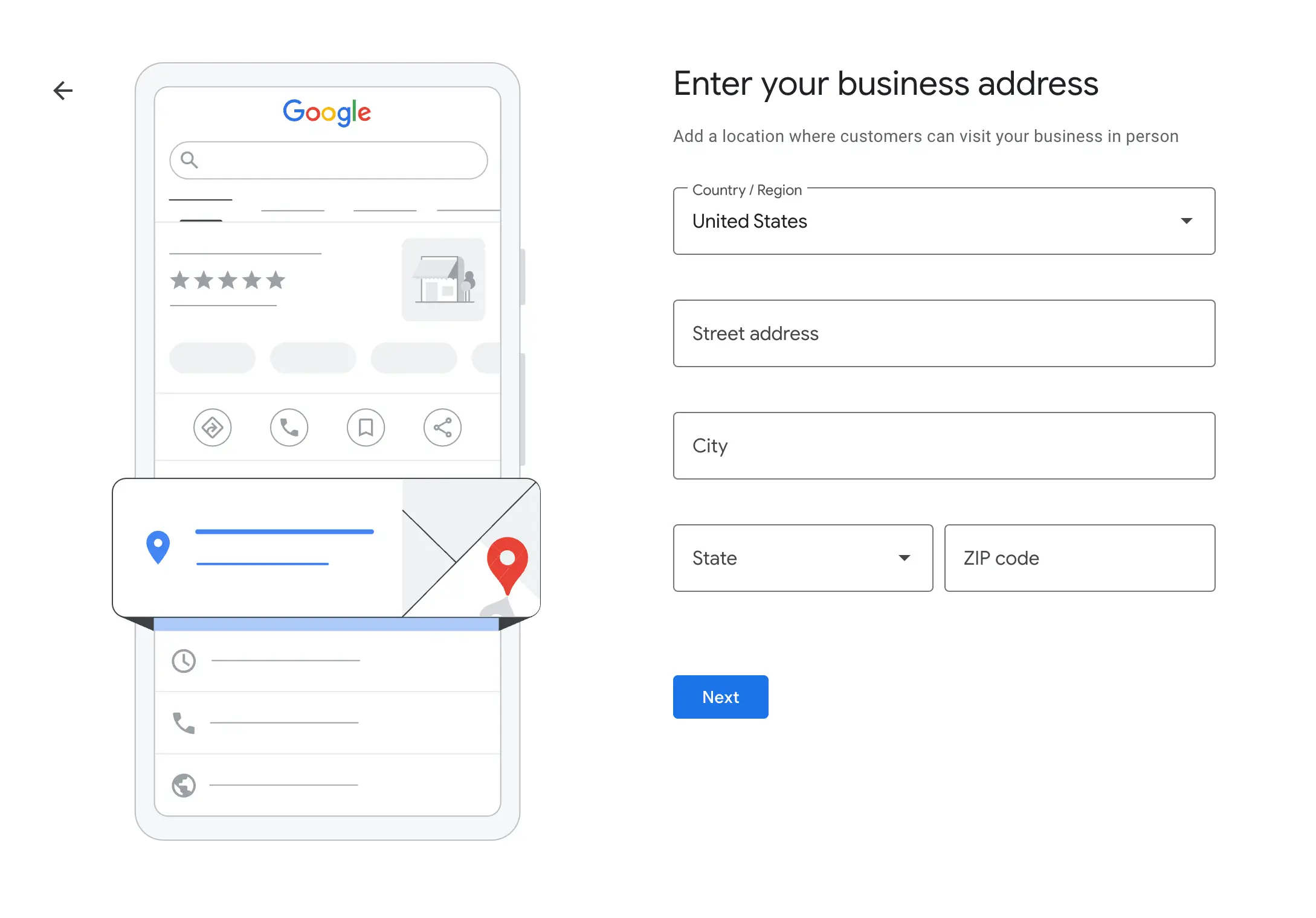
If you selected a physical location, enter your business address. Google will ask you to pinpoint your location on the map, so ensure the details are accurate.
If you’re a service-area business (like a plumber or delivery service), you can opt to hide your address and only specify the service areas, such as cities or zip codes.
Step 6: Choose Your Business Category

Now comes an important step: categorizing your business. Select the most relevant category to help Google match your business with the right customers. For example, if you own a coffee shop, choose “Coffee Shop” as your primary category.
Be specific! Google allows you to choose multiple sub-categories (up to 10), which can help your listing show up for a wider range of relevant searches.
Step 7: Provide Contact Information
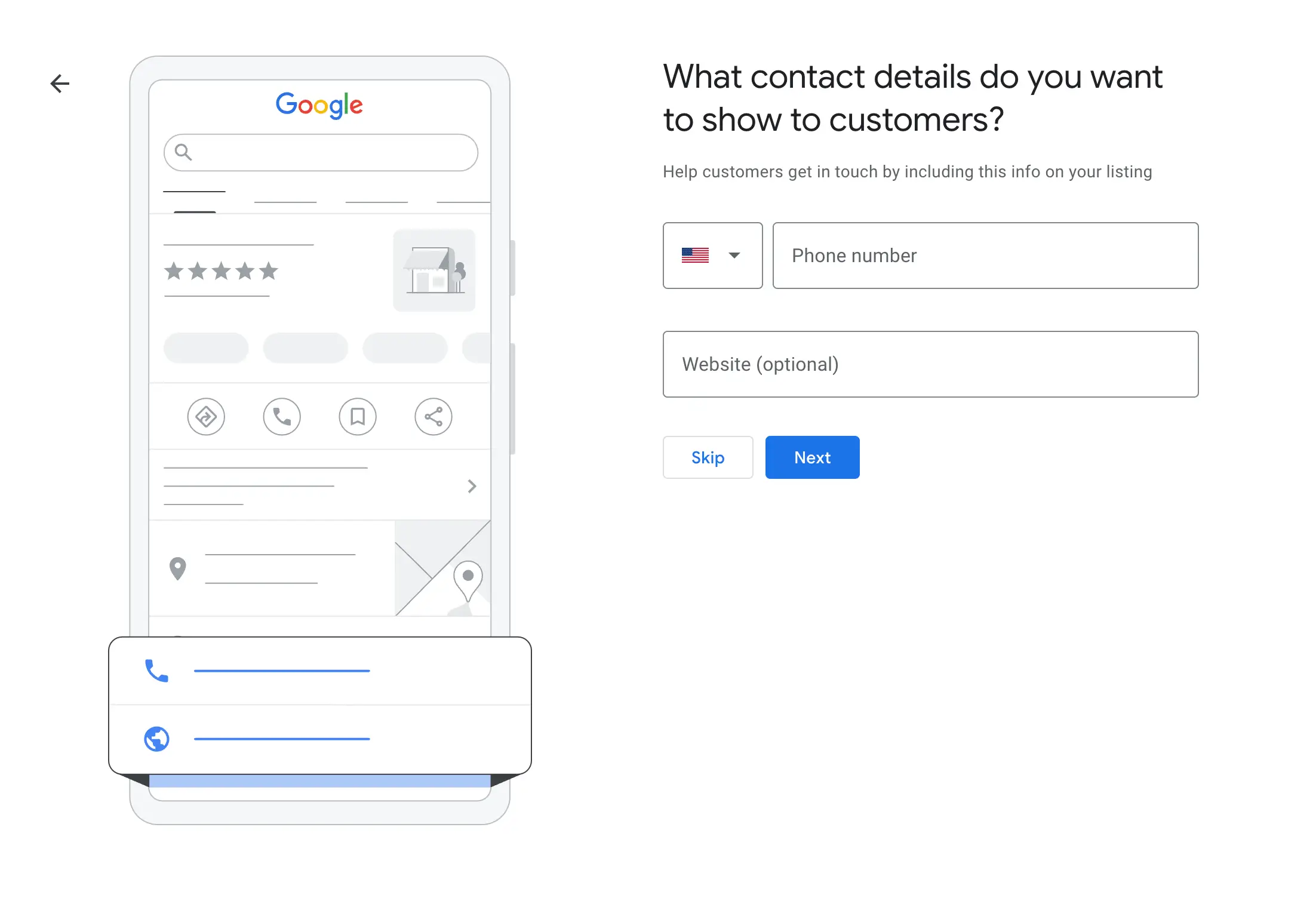
Enter your business phone number and website URL (if available). This allows potential customers to reach you directly. If you don’t have a website, Google offers an option to create a simple free website based on the information you enter.
Step 8: Verification Process
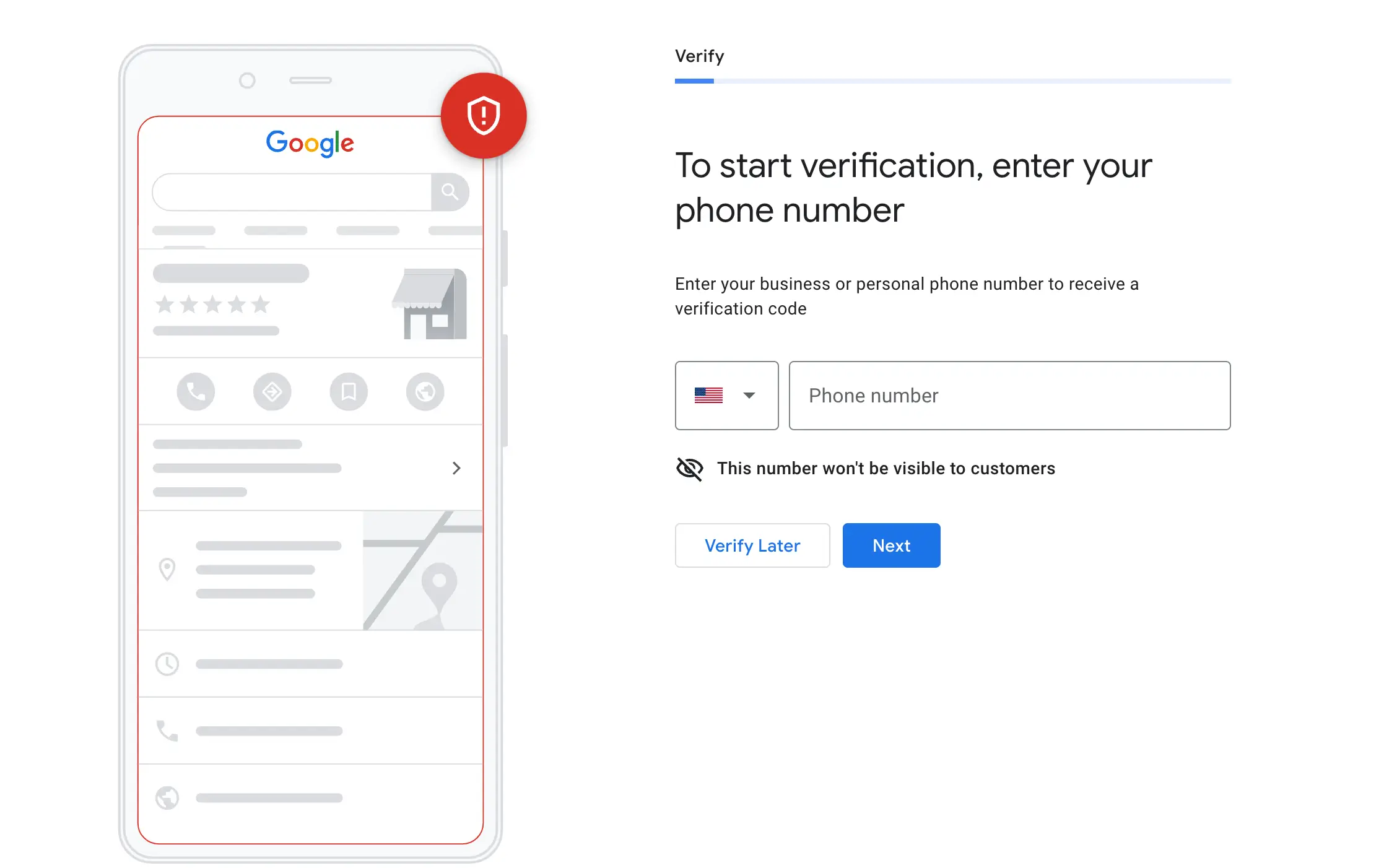
Once all your details are filled in, Google will ask you to verify your business. This step is essential to confirm that you are the rightful owner of the business. Verification typically involves receiving a postcard at your business address, containing a verification code. It may take several days for this postcard to arrive.
If you prefer, you may also have the option for other verification methods like phone or email, depending on the type of business.
Step 9: Optimize Your Profile
While waiting for your verification, you can start optimizing your business profile. Add photos of your business, products, or services to attract more customers. Fill out every available section to make your listing stand out.
- Respond to reviews, update your business hours, and post special offers to keep your profile active and engaging.
By following these simple steps, you’ll know exactly how to get on Google My Business and enjoy the benefits of enhanced visibility in search results.
How to Verify Your Business on Google
Verifying your Google My Business (now called Google Business Profile) is an essential step to ensure that your business appears in Google Search, Maps, and other Google services. The verification process helps confirm that only legitimate businesses or their authorized representatives can manage listings, making it crucial for authenticity and visibility.
Types of Google My Business Verification
- Video Verification
In 2025, video verification has become the most common method, especially for new profiles or those with recent address changes. To verify your business via video, you’ll need to capture footage of your business location, including nearby street signs, building signage, and internal business equipment such as office furniture or point-of-sale systems. Make sure the video complies with Google’s guidelines, avoiding sensitive documents and faces. This method provides a more detailed view of your business, confirming your physical presence. Plus, Google for Business will guide you through the entire process, ensuring successful verification. - Instant Verification
This method is rare but possible for businesses with an established online presence. If Google has enough verified information about your business, such as consistent NAP (name, address, phone) details across multiple websites or listings, your business may be instantly verified without additional steps. However, this option is not guaranteed for every business. This is often considered part of the Google My Business marketing strategy, where a consistent and accurate online presence plays a significant role. - Postcard Verification
For most businesses, postcard verification is still the standard. Google will send a physical postcard containing a verification code to your business address. Once received, you can enter the code in your Google Business Profile to complete the verification. This process can take several days, depending on your location. This is a key part of the Google Business tutorial process, as it’s the traditional method for verifying your Google My Business pages. - Phone Call Verification
Businesses that have been listed for some time but remain unclaimed may be eligible for phone call verification. Google will call the business number listed on your profile and provide a code to enter online. This method is quick, though not all businesses will have this option. It’s an efficient way to verify a Google My Business profile, especially for those that have been around for a while. - Email Verification
Similar to phone verification, email verification is available for businesses that have been active but unclaimed. After selecting the email option, Google will send a verification code to the email address associated with the profile. After entering the code, your business will be verified. This is often available to businesses that have not been fully optimized but are still active on Google Local for Business.
Peculiarities of the Verification Process
Each verification method has its own nuances and potential challenges. For example, video verification requires a clear and focused view of your business environment, so be sure to showcase significant landmarks, signs, and business operations. Postcard verification may take longer, and in some cases, businesses may not receive the postcard due to postal delays or errors, requiring a second attempt. Instant verification is available to a very limited number of businesses and is typically influenced by how much public information Google already has about your business.
To ensure a smooth verification process, make sure your business listing is fully completed and follows Google’s guidelines. A well-optimized listing has a better chance of passing verification and staying active without issues. Once verified, you’ll gain access to powerful tools such as customer reviews, performance insights, and the ability to post updates. These tools are crucial for success in Google My Business marketing and can significantly enhance your Google My Business pages visibility. By completing the verification process, you’ll be ready to start managing your profile, engaging with customers, and utilizing Google’s various features to grow your business.
How to optimize your google business profile
An optimized Google Business Profile can help you reach more customers, boost your rankings, and stand out in local searches. In this guide, we’ll walk you through each step on how to optimize your Google My Business listing effectively.
Step 1: Fill in All Essential Information


The more information you provide, the better Google can understand and rank your business. To begin optimizing your Google My Business profile, log in to your GMB dashboard and navigate to the “Info” section.
Here’s a list of key information to add:
- Business Name: Make sure it matches the name on your website and signage.
- Address: Accurate location helps your customers find you. If you are a service area business, you can opt to hide your address.
- Business Hours: Keep your operating hours updated, especially during holidays.
- Phone Number & Website: Add a local phone number and a link to your website.
- Category: Choose a primary business category that best represents what you offer.
- Services Offered: List the services your business provides.
- Business Description: Write a clear and engaging description of your business. Avoid keyword stuffing, but ensure it’s descriptive enough for potential customers.
By completing your profile thoroughly, you increase your chances of appearing in Google’s local search results, known as the Local Pack, and gaining more visibility.
Step 2: Add High-Quality Photos

Your business profile should include several types of photos. Research shows that listings with photos receive 42% more requests for directions and 35% more click-throughs to websites. Here are some important photo types to add:
- Profile Photos: Ensure that your profile image represents your business well. A logo or a well-lit image of your storefront is ideal.
- Cover Photos: This is the first image people will see when they find your business. It should be high-quality and showcase your business.
- Additional Photos: Add images that represent the services or products you offer. These should be high resolution, well-lit, and relevant.
Don’t forget to optimize your photos for SEO by giving them meaningful file names, like “plumbing-services-office.jpg” instead of something generic like “IMG_0123.jpg.”
Step 3: Choose the Right Google My Business Category
Selecting the right category is one of the most important steps in optimizing your Google Business Profile. Your primary category tells Google what your business is about and can directly influence your ranking in local search results.
For example, if you run a plumbing business, select the “Plumber” category. You can also add secondary categories to describe other services you offer. It’s helpful to check what categories your competitors use and adjust accordingly.
Step 4: Add Services and Attributes

Adding detailed services to your listing helps customers understand what you offer, even though it may not directly influence your ranking. To add services:
- Navigate to the “Services” section in your GMB dashboard.
- Add specific services that your business provides, and include prices if possible.
- Keep your service list updated as you offer new services or change prices.
You can also add Attributes, which provide more details about your business, such as:
- Wi-Fi availability
- Wheelchair access
- Gender-specific services (e.g., woman-led business)
This information will appear on your Google profile and make your listing more informative and attractive.
Step 5: Get and Respond to Reviews

Customer reviews play a significant role in optimizing Google My Business. Positive reviews not only build trust with potential customers but also help improve your rankings in local search results.
Encourage your satisfied customers to leave reviews on your Google profile, and remember to respond to them—whether they are positive or negative. Responding to reviews shows you care about customer feedback and can help boost your business’s credibility.
Google My Business provides a direct link that you can send to customers, making it easier for them to leave a review. This eliminates the need for them to search for your business on their own, streamlining the process and increasing the likelihood of getting timely feedback. By proactively requesting reviews through this link, you can quickly build a strong online reputation and improve your visibility in local search.
Step 6: Post Regular Updates
Google My Business allows you to post updates, offers, events, and news directly to your profile. Regular posts can keep your customers engaged and encourage more clicks on your business listing.
Here are a few types of posts you can make:
- Promotions or Offers: Announce discounts or limited-time offers.
- Events: Share upcoming events or sales.
- Updates: Provide important updates, such as changes in hours or services.
Regular posting also shows Google that your business is active, which can help with your ranking.
Step 7: Monitor Insights and Analytics
Google My Business provides insights into how customers interact with your listing. These insights can help you understand:
- How customers found your business
- Which actions they took (e.g., visiting your website or calling your business)
- How many people requested directions
Use these insights to improve your strategy and track your progress. For instance, if you notice a lot of users are finding your listing through specific keywords, consider optimizing your business description with those terms.
Step 9: Keep Your Information Accurate and Updated
To maintain your Google My Business optimization, you must consistently update your listing. Make sure all business information (like phone number, business hours, and location) is correct, especially when you experience changes (e.g., holiday hours, new products/services, or changes in address).
Step 10: Use UTM Parameters for Tracking Traffic
To track how much traffic you’re getting from your Google My Business listing, use UTM parameters. These parameters help you monitor how much traffic comes specifically from your GMB profile in Google Analytics.Simply add:?utm_source=gmb&utm_medium=organic&utm_content=listing&utm_campaign=local to the end of your website URL in your GMB profile. This will help you track the effectiveness of your Google Business profile optimization and make data-driven decisions.
Why Optimizing Your Google My Business Listing Matters
By optimizing your Google Business Profile, you ensure that your business is visible to the right customers at the right time. A well-optimized GMB listing can lead to higher rankings in local search results, more website clicks, phone calls, and ultimately, more conversions.
Start optimizing your Google My Business profile today and take advantage of the opportunity to boost your business’s visibility and attract more local customers.
Conclusion
If you have any questions about setting up or optimizing your Google My Business profile, feel free to contact us for free consultation. We’re happy to guide you through the process to help enhance your local presence.


